



For incident response teams and Cyber Threat Intelligence (CTI) analysts, today's real challenge isn't a lack of data—it's the ability to correlate, contextualize, and synthesize the massive volume of unstructured information constantly circulating across the Dark Web, underground forums, and encrypted messaging apps like Telegram or Discord.
To address this challenge, Byron Labs has designed a strategic integration connecting Mistral AI's reasoning capabilities with Vysion, our specialized Cyber Threat Intelligence (CTI) platform, linked in real time via the Vysion MCP Server.
In this article, we explain how this technology works and why it transforms threat investigation.
What is Mistral AI and why does it stand out?
Mistral AI has established itself as the European benchmark for state-of-the-art Artificial Intelligence. Far beyond a conventional text generator, Mistral offers an ecosystem of models capable of advanced reasoning, multimodal analysis, and solving complex tasks using natural language.
From an enterprise cybersecurity perspective, Mistral delivers two key operational advantages:
-
Digital sovereignty and regulatory compliance: Its European origins and development ensure a strict framework aligned with EU data governance, privacy, and residency standards.
- Native integration with tools and connectors: Mistral is built to interact directly with external platforms and databases. Rather than offering generic answers based on static knowledge, the model operates within an agentic workflow, querying specialized tools to execute specific tasks.
However, for a language model to deliver real value in technical investigations, it needs to be fed with specialized, verified, and real-time threat data.
Mistral + Vysion: Artificial Intelligence + Specialized CTI = Actionable Intelligence
The integration between Mistral AI and Vysion combines the core strengths of both platforms into an optimized workflow:
-
Vysion (Cyber Threat Intelligence Engine): The platform acts as the specialized layer for ingesting, structuring, and detecting early threats across complex sources like the Dark Web, underground forums, ransomware leak sites, infostealers, and encrypted messaging networks (Telegram and Discord). Instead of feeding raw or unstructured data to the AI model, Vysion processes, filters, and contextualizes information using advanced analytics algorithms, pinpointing attack vectors and Indicators of Compromise (IOCs) to eliminate noise and drastically reduce false positives.
-
Mistral AI (Reasoning and Natural Language Layer): Connects to Vysion via the MCP protocol to serve as the user-facing analytical engine. Its role is to interpret analyst requests in natural language, send the appropriate queries to Vysion's engine, cross-reference the gathered evidence, and synthesize executive or technical reports without leaving the investigation environment.
The Technical Bridge: What is the Vysion MCP Server?
To enable seamless, secure, and low-latency communication between Mistral and the Vysion platform, we leverage the Model Context Protocol (MCP) standard.
The Vysion MCP Server acts as an intermediary connector that exposes Vysion’s search, investigation, and threat-profiling capabilities as "tools" that the AI can automatically invoke.
Key Benefits for Daily SOC/CTI Operations:
-
Fluid natural language investigations: Analysts don't need to memorize complex search syntax or navigate multiple tools. They can ask straightforward questions in plain English (e.g., "Have any company leaks or compromised credentials been detected on Dark Web forums?").
-
Elimination of manual work and time savings: No more manually jumping between disconnected tools or downloading malware samples for AI analysis. Mistral automatically queries the Vysion API via the MCP server and extracts key evidence, reducing investigations that used to take hours down to seconds.
-
Traceability and rigor: Because all data delivered by the MCP server comes directly from Vysion, every insight retains its original source evidence, ensuring that Mistral's conclusions are grounded in verifiable, real-world data without "black box" metrics.
Video Demo: Real-Time Threat Hunting
Watch a quick demonstration of this integration in action below. See how an analyst performs natural language queries while Mistral AI uses the Vysion MCP Server in the background to fetch, analyze, and interpret intelligence directly from the Vysion platform:
How to Connect Vysion MCP Server with Mistral AI
Integrating Vysion’s investigation capabilities into the Mistral AI interface is a simple process that requires no complex deployments or infrastructure changes. Thanks to the Model Context Protocol (MCP) standard, Vysion can be added as a native tool or connector within the AI assistant. Follow these simple steps to activate the connector and start investigating:
What You Will Need
Before getting started, make sure you have the following ready:
- A Vysion account on a plan that includes the MCP server.
- Your Vysion API key, which you received in your email. If you do not have one, reach out at info@byronlabs.io.
- The MCP server endpoint URL: https://mcp.vysion.ai/mcp
- A Mistral AI (Vibe) account. Custom MCP connectors require a plan that supports them, so check your plan before starting.
Step 1: Access Connectors and Marketplace
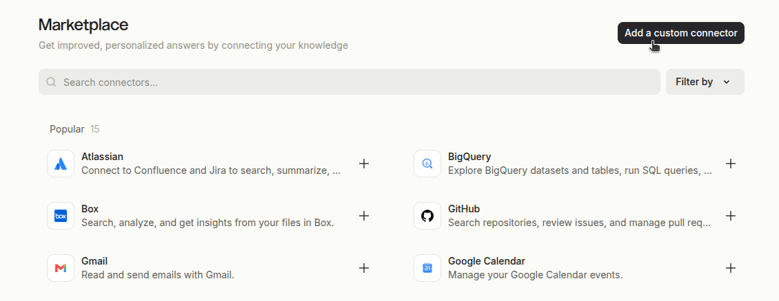
Log in to Mistral AI, open the left sidebar menu, and expand the Context section to select Connectors. Once on the main screen, click the +Add connector button located in the top-right corner.

This will take you to the Marketplace view, where you should click the Add a custom connector button.
 Step 2: Connector Configuration
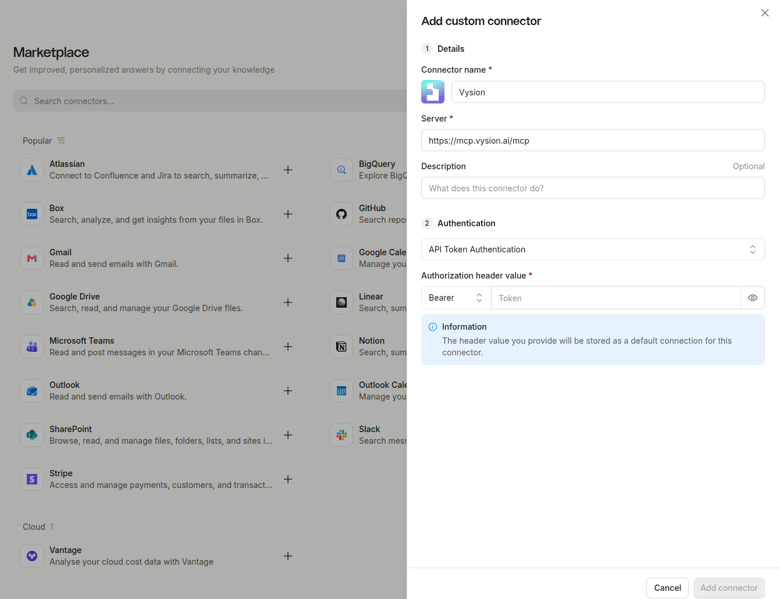
The Add custom connector window will open. Fill out the form with the following details:
- Details:
- Connector name:Vysion(or your preferred identifier for the tool).
- Server: https://mcp.vysion.ai/mcp - Authentication:
- From the main Authentication dropdown menu, select API Token Authentication.
- In the Authorization header value section, keep Bearer selected in the left dropdown and paste your Vysion API Token into the text field on the right.
Click the Add connector button in the bottom-right corner to save your settings. That's it! The connector will now be available in your workspace.
Step 3: Activate It in Your Chat
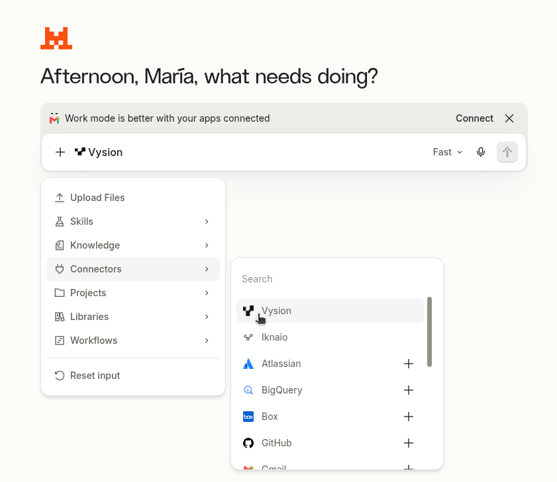
Enabling a connector in the workspace makes it available, but does not automatically activate it for all chats. To use Vysion in a specific conversation, simply select it from the message input bar:
- Click the
+icon located on the left side of the main text bar. - Hover over the Connectors option in the dropdown menu.
- Select Vysion from the list of available connectors.
The Vysion icon will stay pinned next to the + button, confirming that the AI has access to the threat intelligence tools for that session.
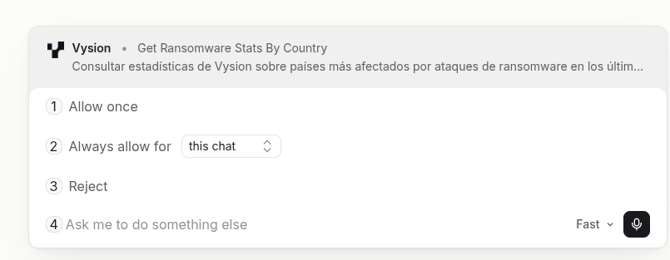
The first time the model needs to query the platform, the interface will pause execution to request access approval (allowing you to authorize it once, remember it for that chat, or reject it). Once permission is granted, the query will process normally.
Step 4: Try It Out with Your First Queries
Once connected, it's time to put the integration to the test.
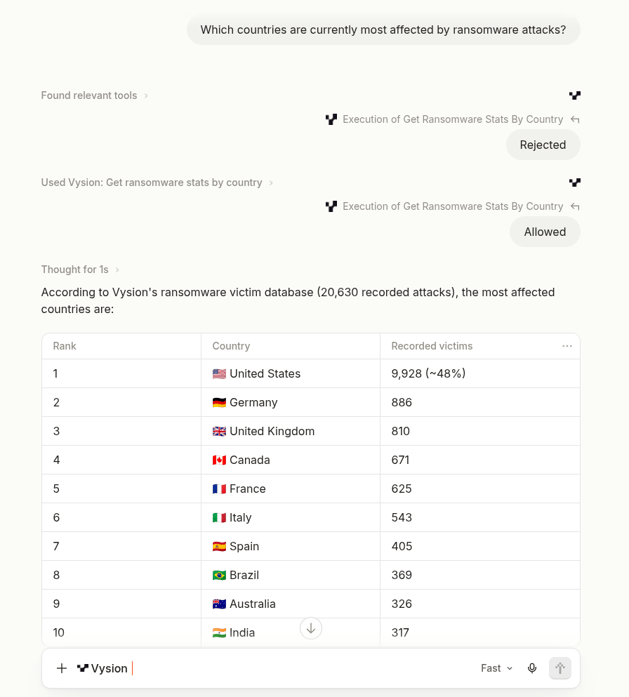
You can start by asking a direct, simple question to verify that everything is configured correctly:
Mistral will identify the request, automatically query Vysion's engines in the background, and return a clear summary with the most recent evidence found.
Once you verify that everything is running smoothly, you can move on to more detailed cyber threat intelligence investigations:
- Threat actor profiling: "Summarize recent attacks and victims associated with the LockBit ransomware group."
- Credential and leak tracking: "Are there any mentions of our corporate domain in infostealer databases or cybercrime forums?"
- IOC contextualization: "Analyze if this IP address has been cited across encrypted messaging networks.
Conclusion
Combining the MCP standard with advanced AI models like Mistral AI marks a major leap forward in cybersecurity operations: Artificial Intelligence evolves from a passive text assistant into an active investigation agent connected in real time to Vysion's validated threat intelligence
Want to learn how to connect Vysion to your security ecosystem via our MCP server or test the platform in your organization? Contact our team to schedule a personalized demo.